
Property record & sketch editing for CAMA data Correct the CAMA record and its sketch, with every change reviewed.
Where your CAMA exposes its full record, Revaluator opens it as an editor: the county's own tables, fields and code lists, the sketch drawn from the CAMA's own data, and rules the county sets for who may change what. Nothing is written into the county's record. Every edit is kept as a change against it, checked as it is typed, and approved line by line before it goes back.
The editor
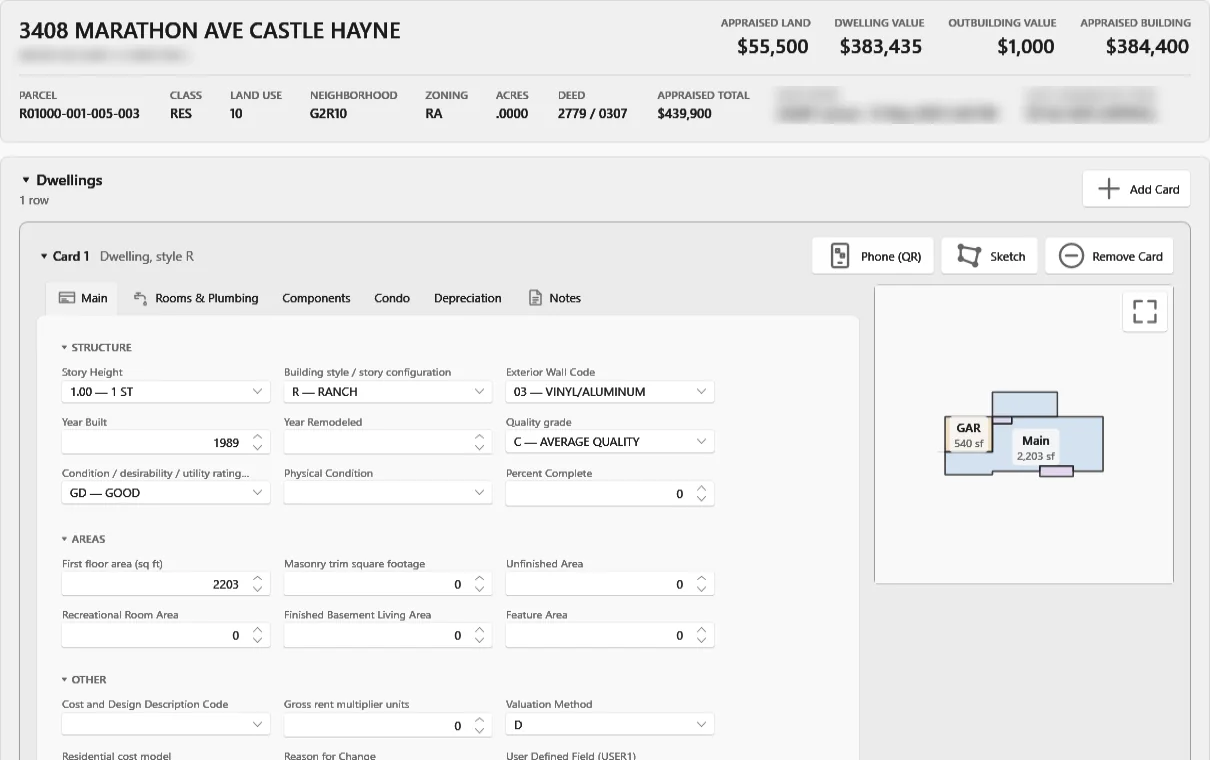
The record staff already know, easier to read.
The parcel's address and values sit across the top. Below them are the sections staff may change — dwellings, additions, outbuildings, commercial cards, land — each building on its own card with tabs for its groups of fields and its sketch beside it. Sales, permits, owners and values follow, to read.
- Every code shown with its name, and every dropdown searchable
- Add a card or a line for new construction; mark one for removal
- A changed field is outlined, and hovering shows the county's value
- Find any field, section or value on the record with one search box
Record forms
A different screen for a different job.
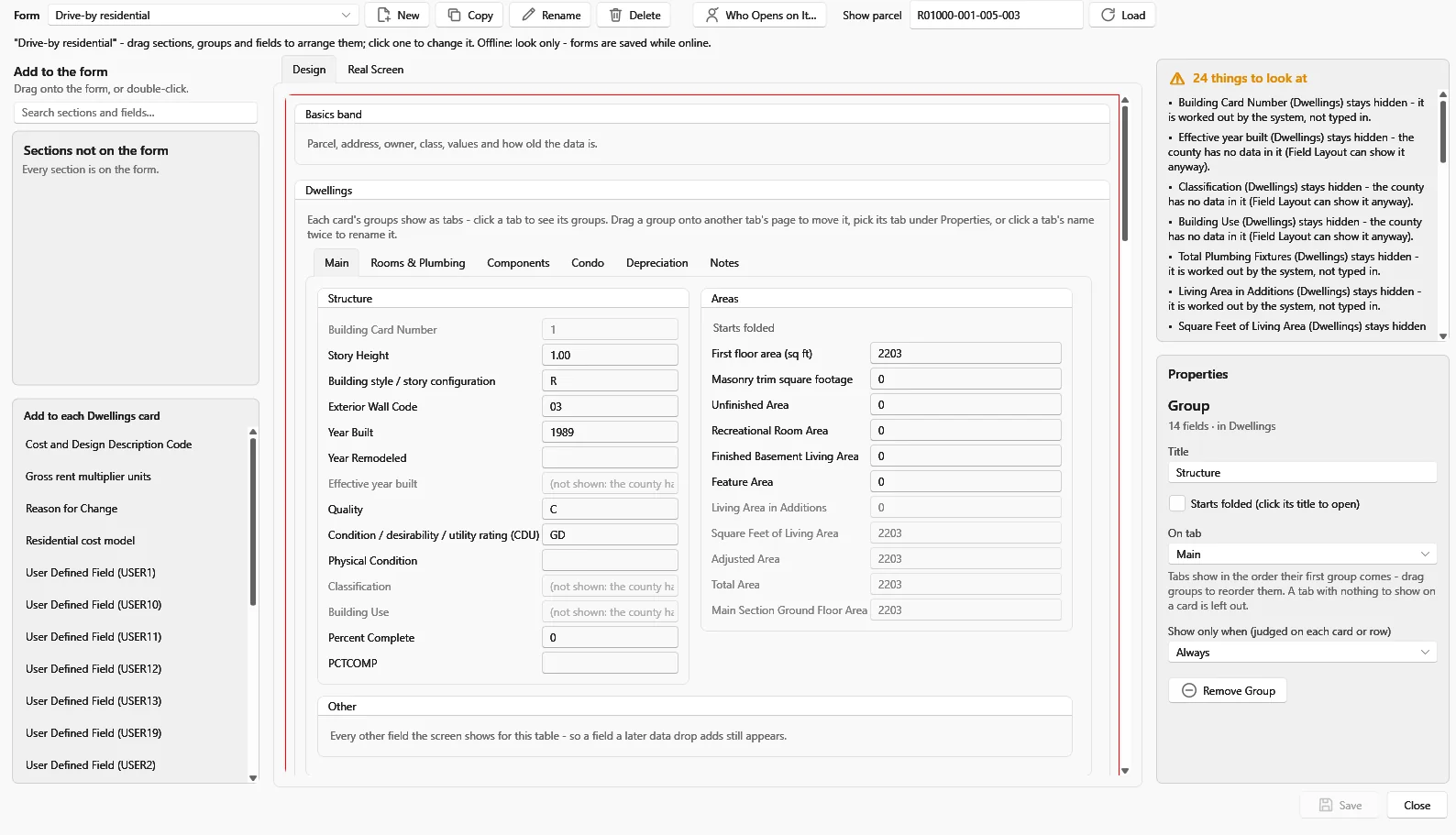
A standard form ships for each CAMA. A county can copy it and make its own in the Form Designer: drag sections and fields into place, rename them, fold what is rarely used. A rule opens the right form for the person and the parcel — a short form for a drive-by crew, the full record for a commercial appraiser.
- Design on the left, the real screen on the next tab
- Show a section only when it applies, such as a field that is filled
- Per-field labels, read-only and required marks on a form
- A form can only narrow what Field Layout allows
The county's rules
Who may change what, decided by the county.
Field Layout
For every field: is it shown, may it be changed, is it required on a new row, what does a new row start with, which codes are offered, does a change need approval, and what do staff call it. For every table: may rows be added or removed.
Field rules
Make one field depend on another: when a field holds a certain value, others are locked, cleared, required, hidden or offered only certain codes. Where the CAMA has such rules of its own, they come built in.
Agreed in Excel
The whole layout exports to a workbook the office can mark up — show, edit, required, codes, rules — and imports back. Anything that would break a rule is refused with the reason.
Rights by role
Changing a field, adding a row, removing one, typing a dollar amount, pulling a parcel from the CAMA and approving changes are separate permissions. Approving your own edits is one more.
Checked as it is typed
Against the county's code lists, against the type, length and range the county's own data has always held, against the field rules, and against the CAMA's own save rules where the CAMA publishes them. A problem is shown on the field, in words.
What stays locked
Keys, stamps and every value the CAMA computes. Revaluator offers only what staff could type in the CAMA itself, and the county can lock or hide any of that.
Sketching
Redraw the footprint on a touch canvas.
The sketch editor reads the CAMA's own sketch — rectangles, diagonals, curved walls, ovals — and writes it back the same way. Drag a wall and its neighbors stretch; drag a corner and the walls turn diagonal; pull a wall into a curve. Areas and perimeters recompute as you go.
- Select, draw, rectangle, oval and curve tools on a movable palette
- Type walls the way the CAMA writes them, or type a length onto a wall
- Duplicate, flip, rotate and split; snap to other shapes' corners
- The county's walls are kept as drawn; only what you move changes
- A county that keeps its sketches in a separate sketching program can open those files from the parcel
Review & return
Nothing goes back unapproved.
Every change waits in Pending Changes with what it was, what it is now, who made it and when. A reviewer approves or rejects each line; a rejected change simply isn't sent. Approved changes are staged for the CAMA in the CAMA's own terms.
- Changes made through the assistant are marked as such
- Edits survive a new extract; one the CAMA changed underneath is flagged
- Revert one change, or all of a parcel's, at any time before it is sent
- Edits made offline travel with the bundle and sync at check-in
- Field visits are added to the log, never edited or erased
Common questions
Editing the record, answered.
Can staff edit the CAMA record from Revaluator?
Where the CAMA exposes its full record, yes: dwellings, additions, outbuildings, commercial sections and land are edited in the CAMA's own tables and fields, with the county's own code lists behind every dropdown. The edits are kept as changes against the county's record, never written straight into it.
Can the county control what each person can see and change?
Yes, at three levels. Roles decide who may change a field, add or remove a card or line, and approve changes. Field Layout decides, field by field, what is shown, editable, required on a new row, limited to certain codes, and whether a change needs approval. Record forms decide how the screen is laid out, and a rule can open a different form by role or by kind of parcel.
What stops a wrong value going back to the CAMA?
Each entry is checked as it is typed: against the county's code lists, against the range and type the county's own data has always held, against rules that make one field depend on another, and, where the CAMA publishes them, against the CAMA's own save rules. Then a reviewer approves or rejects every change, line by line.
Does it handle sketches?
Yes. Revaluator has its own sketch editor. Where the CAMA makes its sketch available, the editor reads it and writes it back the same way: draw, reshape, bow and split walls, with areas and perimeters recomputed as you go. A county that keeps its sketches in a separate sketching program can open those files from the parcel instead.
Are dollar values editable?
Values the CAMA computes are never editable. Revaluator offers only what staff could type in the CAMA itself, and a county can lock or hide any of that in Field Layout.
Keep reading
Where record edits come from, and where they go.
See your own record in the editor.
Send us an extract and we'll show you your tables, your codes and your sketches, editable, with nothing written back.